Scolring - Forum
Entraides et échanges autour de la technologie Scol - Informations and exchanges on the Scol technology
Vous pouvez changer la langue de l'interface une fois inscrit - You can change the language once registered
You are not logged in.
- Topics: Active | Unanswered
#126 Re: Openspace3D » OpenSpace3D Ne Se Lance Pas Avec Steam Proton Sur Linux. » 27-May-2024 06:39:58
Hello, tu peux modifier le fichier usm.ini pour activer les logs.
Avec le fichier de log on pourra comprendre ce qui se passe.
#127 Re: OpenSpace3D Beta program » OpenSpace3D 1.93 Beta3 » 21-May-2024 19:46:58
Weird I changed nothing on particles, I'll check that, maybe a material issue.
#128 Re: OpenSpace3D Beta program » OpenSpace3D 1.93 Beta3 » 21-May-2024 19:45:09
Hehe sorry not yet, I'll try to make a beta in the next month.
I worked on a multi platform text to speech based on piper but I still have some work on it, ans it's a pain to build on some platforms ^^
#129 Re: Openspace3D » Redmine Crash Et Wishlist » 8-May-2024 21:24:22
En effet  merci je vais regarder
Edit: it's back
#130 Re: OpenSpace3D Beta program » OpenSpace3D 1.93 Beta3 » 30-Apr-2024 09:24:09
Good catch thanks 
#131 Re: OpenSpace3D Beta program » OpenSpace3D 1.93 Beta3 » 22-Apr-2024 20:35:53
Thanks I will check that
#132 Re: OpenSpace3D Beta program » OpenSpace3D 1.93 Beta3 » 16-Apr-2024 08:22:24
Hello,
I'm working on several improvements, but not yet on instantiate or decal.
I have no specific date for beta 2 but it will come when I have a stable version o current developements.
What coming next is,
- subtitle plugit, that compute input text in a timed text
- log file plugit that allow to save input text into a log file
- some update on ChatGPT plugIT
- Quad buffer stereo working again.
- Some improvement on the VRPN plugIT
- improvements on speech recognition on android and windows
...
#133 Re: Openspace3D » Maîtrise difficile du pathfinding Et Bugs Trouvés » 9-Apr-2024 13:39:57
Tu peux définir une sequence de positions du personnage.
enemy.target reached -> sequence in
sequence.out1 -> enemy.go to: 10 0 10
....
#134 Re: Openspace3D » Maîtrise difficile du pathfinding Et Bugs Trouvés » 4-Apr-2024 10:50:00
fait un clique droit sur le lien > "enregistrer le lien sous..." pour télécharger le fichier.
merci pour l'exemple
#135 Re: Openspace3D » Maîtrise difficile du pathfinding Et Bugs Trouvés » 3-Apr-2024 17:21:33
Voici un exemple : https://www.openspace3d.com/rsc/samples … crowd.pkos
#136 Re: Openspace3D » Maîtrise difficile du pathfinding Et Bugs Trouvés » 3-Apr-2024 17:13:15
Bonjour,
Concernant l'orientation des personnages, tu as un paramètre pour définir la direction.
Pour le navmesh tu peux soit utiliser plusieurs instances pour y ajouter des objets, soit tu utilises la hiérarchie, tu mets les obstacles et autres objets de navigation en fils du premier. le plugit déterminera en fonction des paramètres physiques des objets si il les prends en obstacle ou en zone de navigation.
je veux bien une scène de test qui provoque le crash pour corriger
#137 Re: OpenSpace3D Beta program » OpenSpace3D 1.93 Beta3 » 3-Apr-2024 17:02:03
Hello,
for now I don't tink I'll be able to make anything for Apple vision pro. I would need a powerfull Mac with latest ARM CPU and an a Vision pro... So about 10000€ just to be able to work on this....
#138 Re: OpenSpace3D Beta program » OpenSpace3D 1.93 Beta3 » 2-Apr-2024 09:38:55
Hello,
yes you can use passthrough feature on Quest2 Quest3 and Pico4
still since we cannot access the camera stream directly we can't detect markers in scene.
#139 Re: OpenSpace3D Beta program » OpenSpace3D 1.93 Beta3 » 27-Mar-2024 08:56:06
Hello, I din't had the time to check the instantiate plugIT yet.
#140 OpenSpace3D Beta program » OpenSpace3D 1.93 Beta3 » 26-Mar-2024 10:06:00
- arkeon
- Replies: 93
The new OpenSpace3D 1.93 Beta is available for tests
It include:
- new normal map and Roughness/Metalness texture editor in the material editor
- Chat GPT plugit, compatible with OpenAI style API and now stream results.
- Path finding plugITs including navigation mesh, simple pathfinding and crowd plugITs
- The video plugIT can now display control bar in the video content.
- UI plugITs now can have a fade in / fade out animation
- Draw plugIT allow to fill an area and manage better the mouse In/Out in the content
- Text to speech available on several platforms (Windows, Android, Linux...)
- Speech recognition with natural retranscription.
- Linux and Raspberry now use SDL and run under the graphic interface. For now dialogs and files dialogs are not yet implemented.
- New export for raspberry pi 4/5 and arm64, removed export for raspberry pi zero
- Meta Quest / Pico export is now named Android XR export since they both use the official native OpenXR loader.
- Pico 4 S is supported with the controllers
- OpenXR hands tracking / interaction have been improved using XR_HAND_INTERACTION_EXTENSION
- Android use API 34
#141 Re: Openspace3D » Nouveau Problème Sur Mon Shoot Em Up » 21-Mar-2024 09:55:35
Oui pour le plugIT video il y aura une action et un paramètre pour choisir si la barre de control est visible au survol, tout le temps ou pas du tout
#142 Re: Openspace3D » Decals, Instances Et Groupe De Scène D'Objet » 21-Mar-2024 09:25:49
Bonjour,
oui un plugIT decal serait possible, il suffit d'un lancé de rayon pour récupérer la position et la normale pour créer un plan orienté sur la face avec des textures random. Je verrais pour le faire quand j'aurais le temps.
Je n'ai pas encore regardé pour améliorer le plugIT instantiate, je ne sais pas encore ce qui sera faisable ou pas.
#143 Re: Openspace3D » Nouveau Problème Sur Mon Shoot Em Up » 18-Mar-2024 13:30:47
vérifies tes liens, tu as peut être un nom de tunnel qui ne correspond pas.
#144 Re: Openspace3D » Texture Animé??? » 15-Mar-2024 08:01:18
Bonjour, sous 3DS max tu peux mettre une texture au format ifl, c'est juste un fichier texte avec la sequences des images, cela est géré par l'export easy ogre exporter.
Sinon tu peux créer ou modifier un fichier .material, dans les paramètres de texture tu remplaces le mot clef texture par anim_texture et tu mets la sequence des images à la suite. Je n'ai pas prévus de géré cela pour le moment dans l'éditeur de matériaux.
https://ogrecave.github.io/ogre/api/1.1 … 05ftexture
Une troisième solution c'est d'utiliser un élément d'interface, comme le plugit button par exemple. avec une image contenant la sequence de l'animation, tu défini le nombre d'images et d'état. Tu peux utiliser l'état pour changer l'animation du sprite.
Une image d'exemple se trouve dans la démo FPSDemo demos\FPSDemo\interf\visor.png
#145 Re: Openspace3D » Nouveau Problème Sur Mon Shoot Em Up » 14-Mar-2024 15:28:33
Bonjour,
je pense que la collision empêche l'autre vaisseau de bouger. tu peux désactiver "disable" le vaisseau toucher sur le physic tools.
#146 Re: Openspace3D » IA Et Ouverture d'IOS par le DMA » 14-Mar-2024 14:08:18
Work in progress
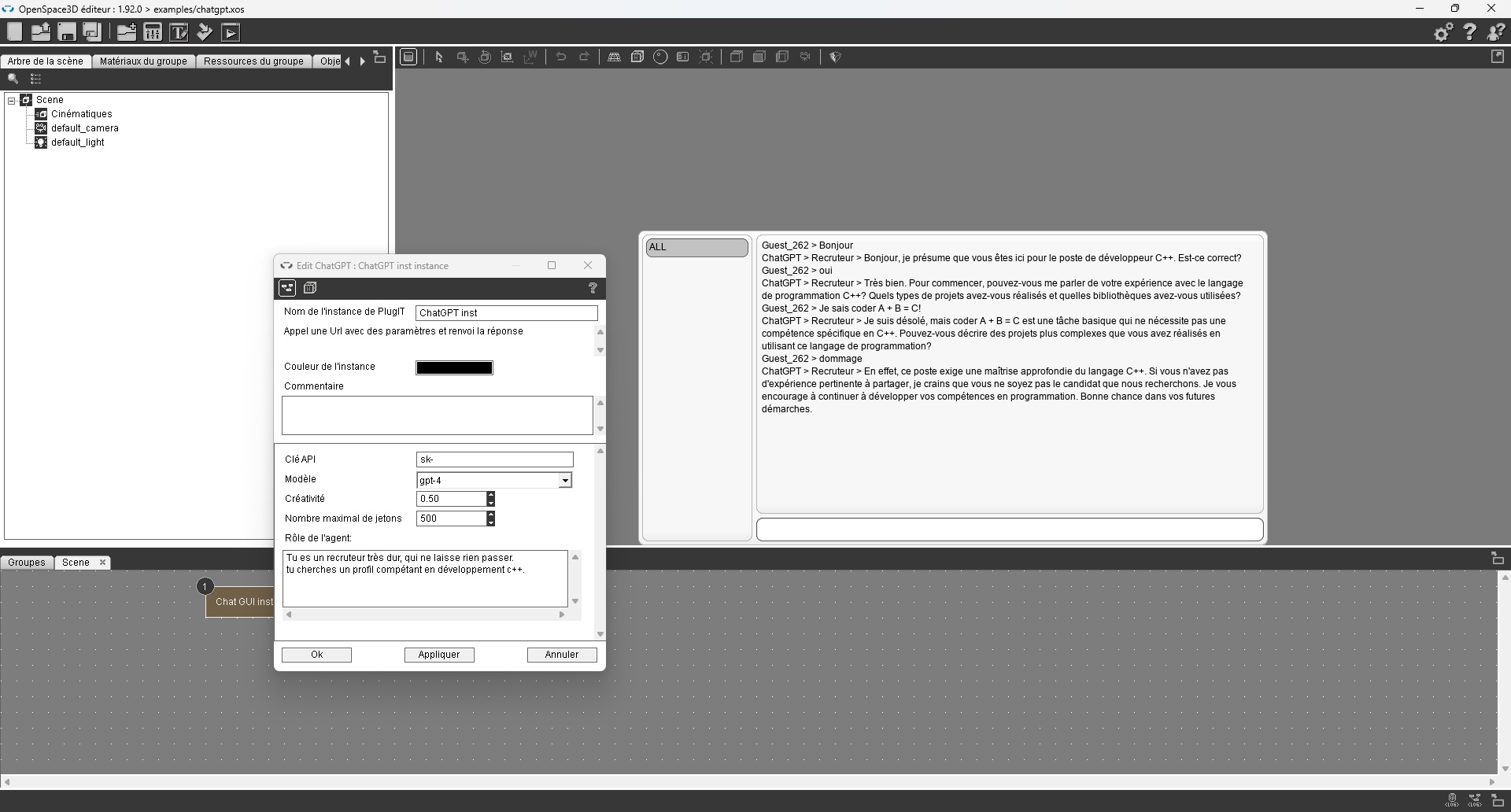
#147 Re: Openspace3D » Question Sur La Physique Et Remarque Sur Les Joysticks » 6-Mar-2024 07:31:30
L'IA générative pour le moment c'est surtout des API web avec des token pour les requêtes. on pourrais faire un plugit qui interroge un chat box et renvois les réponse, pour faire parler un personnage par exemple. Mais pour le moment tu ne sais pas qui permet de le faire réellement gratuitement.
#148 Re: Openspace3D » Question Sur La Physique Et Remarque Sur Les Joysticks » 5-Mar-2024 08:56:02
Hello,
1) avec le plugit impulse point tu peux définir un champ de force continue, tu peux aussi modifier le vecteur de gravité
2) tu changes le vecteur de gravité, par exemple en fonction de la surface en contact
3) non ^^
4) cela dépend des liens je pense. tu utilise le lien .control ?
#149 Re: Openspace3D » about problems with joysticks » 27-Feb-2024 10:21:33
well this kind of joystick have particular drivers generally. It's possible that you can change the axis in the joystick configuration panel.
If not, you can link all the plugit output to a log plugit to check which axis or button is triggered.
Often on this kind of joystick the right axis or left axis can be inverted, or also Y axis can be on another axis like Z
#150 Re: Openspace3D » VR basic » 27-Feb-2024 09:58:17
Hello,
on Pico when the fps drop too much it lower the resolution automatically. remove the shadows on this demo and try again.
Yes the template work with all vr headset.