Scolring - Forum
Entraides et échanges autour de la technologie Scol - Informations and exchanges on the Scol technology
Vous pouvez changer la langue de l'interface une fois inscrit - You can change the language once registered
You are not logged in.
- Topics: Active | Unanswered
#26 Re: Programing » float multiplciation resulting in 0 » 8-Oct-2024 01:35:04
let's say i have a function that once in a while makes a variable , say, x, = 0, how do I handle things so it doesn't get calculated and crash the vm?
thanks!
-Dan
#27 Programing » float multiplciation resulting in 0 » 7-Oct-2024 16:12:33
- hebdemnobad
- Replies: 5
hello everyone
I am having a problem with two floats, neither of which is equal to 0.0, being multiplied and resulting in 0.0...
 let _fooS strcatn "derived r from getmyhexcoordinates is: ":: (itoa r)::nil-> string in// this shows -derived r from getmyhexcoordinates is: -100 in log
  let sqrt (3.0)  *. (itof r) -> squaretimesr in
  let _fooS strcatn "square root of 3 times r is: " :: (ftoa squaretimesr)::nil -> string in // this shows "square root of 3 times r is: 0.000000" in the log
I also tried putting the 3.0 outside of parenthesis to the same result
 let _fooS strcatn "derived r from getmyhexcoordinates is: ":: (itoa r)::nil-> string in// this shows -derived r from getmyhexcoordinates is: -100 in log
  let sqrt 3.0  *. (itof r) -> squaretimesr in
  let _fooS strcatn "square root of 3 times r is: " :: (ftoa squaretimesr)::nil -> string in // this shows "square root of 3 times r is: 0.000000" in the log
any guidance welcome!
-Dan
#28 Re: Programing » very embarrasing running scol files viewing logs [solved] » 6-Oct-2024 15:28:20
nevermind i found the log files in:
C:\Users\usernamewhatever\AppData\Local\Scol Voyager\Logs
#29 Re: Programing » hexagon grid project wip » 6-Oct-2024 05:31:25
ok. i think i can create an array of hex objects in qrs space that is an arbitrary height in rows of hexes and width in columns of hexes, the size of each hex, and whether the first column is lower than the second colum or the first column is higher than the second column, where the q r and s coordinates always add to zero.
the problem is turning the qrs (like xyz coordinates) coordinates into xy coordinates so they can be drawn or be used to arrange meshes in os3d. fortunately i have a retired math professor in the family and got him interested enough in the qrs conversion to xy conversion... (the code below has preloaded the consle.pkg from the tutorials to display everything.
hextable.scol
_load "hextable/hexload.pkg"hexload.pkg
proto hextablemain = fun [] I;;
proto consolemain = fun[] I;;


fun main()=
_showconsole;
_load "os3dlib/tools.pkg";
_load "hextable/console.pkg";
_load "hextable/hextable.pkg";


_fooS "in hexload main function";
consolemain;
hextablemain;
0;;
hextable.pkg
// nested table syntax typeof Globalgrid = tab [I tab [S tab F]];;


typeof Global_startvectable = tab QRSCoordinate;;
typeof Global_hextable = tab tab Hex;;//this is a table. each element in the table contains a table of hex objects. the table is total_columns long and total  rows high see makehexgrid function below
proto mygetcoordinates = fun [QRSCoordinate] [I I I];;
proto makestartvectable = fun [I I S] I;;
proto scalevector = fun [[I I I] I ] [I I I];;

//vertex object with qrs coordinates
struct QRSCoordinate=[
	posq:	I,
	posr: I,
	poss: I,
	getcoordinates: fun [QRSCoordinate] [I I I]
	]mkQRSCoordinate;;

struct Hex= [
	hexcenter: 	QRSCoordinate,
	hexsize:		I,
	fungethexcenter: fun [Hex]  [I I I],
	funprinthex: fun [Hex] S
	]mkHex;;


fun get_full_startvector_table_contents (startvectortable)=

fun mygetcoordinates(qrs)=
	let qrs.posq-> q in
	let qrs.posr-> r in
	let qrs.poss-> s in
	[q r s];;

fun getmyhexcoordinates (hex) =
	let hex.hexcenter -> qrs_center in
	mygetcoordinates qrs_center;; //this function takes hex and returns [q r s] for qrs object in its center

fun myprinthex (hex)=
	let exec hex.fungethexcenter with [hex] -> [q r s] in
	let strcatn "this hex q center is at: ":: (itoa q)::" it's r center is at: ":: (itoa r):: " and its s center is at: "::(itoa s)::nil -> string in
	(
		console_print lastcsl string;
		string);;

fun makeQRS(q, r, s)=
	let mkQRSCoordinate [q r s nil]-> qrs in
	(
	set qrs.getcoordinates=@mygetcoordinates;
	qrs);;

fun makeHex(qrs, size)=
let mkHex [qrs size  @getmyhexcoordinates @myprinthex] -> hex in
hex;;

fun scalevector (directional_vector, scale_factor)=
	let directional_vector -> [q r s] in
	let q*scale_factor -> newq in
	let r*scale_factor -> newr in
	let s*scale_factor -> news in
	[newq newr news];;


fun addvec_with_direction (inputvector, direction, distance)= //this function takes a vector and direction and returns a new vector object,the result depending on the the direction this package has already loaded the os3d tools.pkg so it can use functions from it

	if ((strcmp direction "northeast") ==0) then
	(
	//console_print lastcsl"adding new vector to the northeast!";
	let [1 (-1) 0] -> directional_vector in
	let distance -> factor in
	let scalevector directional_vector factor ->  scaled_directional_vector in
	let addVector inputvector scaled_directional_vector -> outputvector in

	let outputvector -> [q r s] in
	(
	//console_print lastcsl strcatn "new q is: "::(itoa q)::" new r is: "::(itoa r):: " and new s is: ":: (itoa s)::nil;
	outputvector;
	);
	)
	else if ((strcmp direction "southeast") ==0) then
	(
	let [1 0 (-1)] -> directional_vector in
	let distance -> factor in
	let scalevector directional_vector factor ->  scaled_directional_vector in
	let addVector inputvector scaled_directional_vector -> outputvector in

	let outputvector -> [q r s] in
	(
	//console_print lastcsl strcatn "new q is: "::(itoa q)::" new r is: "::(itoa r):: " and new s is: ":: (itoa s)::nil;
	outputvector;
	);
	)

	else if ((strcmp direction "north") ==0) then
	(
	//console_print lastcsl"adding new vector to the north!";
	let [0 (-1) 1] -> directional_vector in
	let distance -> factor in
	let scalevector directional_vector factor ->  scaled_directional_vector in
	let addVector inputvector scaled_directional_vector -> outputvector in

	let outputvector -> [q r s] in
	(
	//console_print lastcsl strcatn "new q is: "::(itoa q)::" new r is: "::(itoa r):: " and new s is: ":: (itoa s)::nil;
	let q+r+s -> result in
	if (result == 0) then console_print lastcsl"no error" else console_print lastcsl"error!!";
	outputvector;
	);
	)


	else
	(
	nil
	);;


fun make_column (hexgrid, hexlist, currentcolumn_number, currentrow_number, inputqrs, total_rows, hexsize)=
console_print lastcsl strcatn "presently in column number: ":: (itoa currentcolumn_number)::nil;
if (currentrow_number<total_rows)  then
(

console_print lastcsl strcatn "currently in row number: ":: (itoa currentrow_number):: " and we will take the inputqrs and make a hex here!":: "\n":: "then we will feed a new QRS object into the function"::nil;
let makeHex inputqrs hexsize-> hex in
let lcat hexlist hex::nil -> hexlist in
let exec inputqrs.getcoordinates with [inputqrs] -> inputvec in
let addvec_with_direction inputvec "north" hexsize -> newvec in
let newvec -> [q r s] in
let makeQRS q r s -> newqrs in
(
 myprinthex hex;
set currentrow_number=currentrow_number+1;
make_column hexgrid hexlist currentcolumn_number currentrow_number newqrs total_rows hexsize;
hexlist;
);
)

else //we are done with the column, turn the list into a table, and put it in the currentcolumn_number of the Global_hextable
(
console_print lastcsl strcatn "done with column number: " ::(itoa currentcolumn_number):: nil;
let sizelist hexlist -> size in
let listtotab hexlist -> hextable in
let sizetab hextable -> tablesize in
(
console_print lastcsl strcatn "there are : ":: (itoa size):: " items inthe hexlist"::nil;
console_print lastcsl strcatn "there are : ":: (itoa tablesize):: " items inthe hextable"::nil;
set Global_hextable.currentcolumn_number = hextable;
let sizetab Global_hextable.currentcolumn_number -> sizable2 in
console_print lastcsl strcatn "there are :" :: (itoa sizable2):: " elements in column number"::(itoa currentcolumn_number)::nil;
hexlist;
//todo test contents of table of tables of hexes and validate their  coordintaes
);
);;


fun fillvectortable (vector, hexsize, qrstable, startstate, rownumber)=
	if (rownumber ==0) then
	(
	console_print lastcsl "we are at start vecdtor table item zero;Global_startvectable.0  has already been set, the only thing left it to determine whether to go southeast (evens up) or northeast (odds up)";
	if ((strcmp startstate "evens up") ==0) then
	(
		//go southeast, and feed in vector of this item to form next item
		//we want to make vector for first odd number to feed into function
		let addvec_with_direction  vector "southeast" hexsize-> newvector in
		(
		 set rownumber = rownumber+1;
	    fillvectortable newvector hexsize qrstable startstate rownumber;
		0;
		);

	0;
	) else
	(
		let addvec_with_direction  vector "northeast" hexsize-> newvector in
		(
		 set rownumber = rownumber+1;
	    fillvectortable newvector hexsize qrstable startstate rownumber;
		0;
		);

		//go northeast and feed in vector of this item to form next item
		//we want to make vector for first odd number to feed into function

	0;
	);

	0;
	)


	else if (rownumber == (sizetab qrstable)) then
	(
	console_print lastcsl"we are at end of table; ";
	get_full_startvector_table_contents Global_startvectable;
	0;
	)
	else
	(
	if ((mod rownumber  2)!= 0) then//odd number fork
	(
			console_print lastcsl"we have an odd  number";
			if ((strcmp startstate "evens up") ==0) then //if evens up then odd numbers make a new vector to the northeast
			(
					console_print lastcsl"go northeast because evens are up and odds are down";
					let addvec_with_direction  vector "northeast" hexsize-> newvector in
					let vector -> [q r s] in
					let makeQRS q r s -> newqrs in
					(
               set Global_startvectable.rownumber = newqrs;
               set rownumber= rownumber+1;
               fillvectortable newvector hexsize Global_startvectable startstate rownumber;
					);
			0;
			)
			else
			(
					console_print lastcsl"go southeast because odds are above evens"; //if evens down then odd numbers make a new vector to the southeast
					let addvec_with_direction  vector "southeast" hexsize -> newvector in
					let vector -> [q r s] in
					let makeQRS q r s -> newqrs in
					(
               set Global_startvectable.rownumber = newqrs;
               set rownumber= rownumber+1;
               fillvectortable newvector hexsize Global_startvectable startstate rownumber;
					);
			0;
			);
	0;
   )

   ///even number fork
  else
   (
   console_print lastcsl"we have an even number";
   if ((strcmp startstate "evens up") ==0) then
			(
					console_print lastcsl"go southeast because evens are up and odds are down";//if evens up then even numbers make a new vector to the southheast
					let addvec_with_direction  vector "southeast" hexsize-> newvector in
					let vector -> [q r s] in
					let makeQRS q r s -> newqrs in
					(
               set Global_startvectable.rownumber = newqrs;
               set rownumber= rownumber+1;
               fillvectortable newvector hexsize Global_startvectable startstate rownumber;
					);
			0;
			)
			else
			(
					console_print lastcsl"go northeast because odds are above evens"; //if odds up then even numbers make a new vector to the norththheast
					let addvec_with_direction  vector "northeast" hexsize-> newvector in
					let vector -> [q r s] in
					let makeQRS q r s -> newqrs in

					(
               set Global_startvectable.rownumber = newqrs;
               set rownumber= rownumber+1;
               fillvectortable newvector hexsize Global_startvectable startstate rownumber;
					);
			0;
			);
	0;
   );
   0;
 	);
  	0;;


fun makestartvectable(size, hexsize, startstate)=
	set Global_startvectable = mktab size nil;
	let makeQRS 0 0 0 -> r in
	let 0 -> rownumber in
	let mygetcoordinates r -> startcoordiantes in//this will be [0 0 0]
	(
	set Global_startvectable.0 = r;
	fillvectortable  startcoordiantes hexsize Global_startvectable startstate rownumber;
	0;
	);
	0;;

	fun makehexgrid (total_columns, total_rows, hexsize, startstate)=
	makestartvectable total_columns hexsize startstate;
	let mktab total_columns nil-> table in
	let 0-> column_counter in
	let 0-> column_number in
	(
	set Global_hextable= table;
	while (column_counter < total_columns) do
	(
	let Global_startvectable.column_counter -> initialqrs in
	//make_column arguments: hexgrid, hexlist, currentcolumn_number, currentrow_number, inputvec, total_row, hex size
  make_column table nil column_counter 0 initialqrs total_rows hexsize;
  set column_counter= column_counter +1;
  );
  0;
  );
	0;;

fun hextablemain()=
_showconsole;
//the number after the function call is the number of vectors in the vector table which will be the number of columns in the hex table

makehexgrid  3 3 1 "evens up";
//do some tests
myprinthex Global_hextable.0.0;
myprinthex Global_hextable.1.2;
myprinthex Global_hextable.2.2;
0;;#30 Re: Programing » problem: something faulty with assigning function to object [solved] » 30-Sep-2024 18:26:00
ok i found the error
In the struct I had [] braces where in the prototype return type i should not have had them for the function prototyping.
I changed
funmakeqrsvertices: fun [Hexagon] [tab QRSCoordinate],to
funmakeqrsvertices: fun [Hexagon] tab QRSCoordinate,and the code runs without a problem
#31 Re: Programing » very embarrasing running scol files viewing logs [solved] » 30-Sep-2024 18:24:08
hi i have everything working now (.scol files get the .pkg files to run code, including showing the console)...however when I have an error in my code, the console won't display at all, and I can't seem to find the relevant log file for each individual .pkg run. any pointers are welcome.
-Dan
hi respectfully bumping
#32 Re: Programing » very embarrasing running scol files viewing logs [solved] » 30-Sep-2024 18:22:31
hi i have everything working now (.scol files get the .pkg files to run code, including showing the console)...however when I have an error in my code, the console won't display at all, and I can't seem to find the relevant log file for each individual .pkg run. any pointers are welcome.
-Dan
hi respectfully bumping
#33 Programing » problem: something faulty with assigning function to object [solved] » 30-Sep-2024 18:13:54
- hebdemnobad
- Replies: 1
hello
I define the object QRSCoordinate as this:
struct QRSCoordinate=[
	posq:	I,
	posr: I,
	poss: I
	]mkQRSCoordinate;
and the object Hexagon as this:
struct Hexagon=[
	VQRScenter:	QRSCoordinate,
	Isize:	I,
	lxypoints:	tab XYVertex,
	lqrspoints: tab QRSCoordinate,
	funcwithinbounds: fun [[Hexagon XYVertex]] I,
	funmakeqrsvertices: fun [Hexagon] [tab QRSCoordinate],
	funconvert_xy_to_qrs: fun [Hexagon][I I I],
	funconvert_qrs_to_xy:	fun [Hexagon][I I]


	]mkHexagon;;
the code includes this function, which should return a table of QRSCoordinate objects:
  fun create_vertex_qrscoordinates(hex)=

			set hex.lqrspoints = mktab 6 nil;
			let hexvqrsvectors -> globalvectorlist in
			let hex.VQRScenter -> hexcenter in
			let hexcenter.posq-> q in
			let hexcenter.posr -> r in
			let hexcenter.poss -> s in
			let hex.Isize -> size in
			let 0 -> counter in
			(
				while (counter<(  sizetab hex.lqrspoints)) do
					(
						let globalvectorlist.counter-> this_vector in
						let this_vector -> [this_vector_q this_vector_r this_vector_s] in
							(

							let mkQRSCoordinate [50 0 0]-> thisvertex in

							(


							set hex.lqrspoints.counter = thisvertex;


							0;
							);
							set counter = counter+1;
							0;

							);
						0;
					);

			0;

			);

	let  hex.lqrspoints-> table in
	table;;
when I use mkHexagon here:
fun inithex()=

		let mkXYVertex  [1 1]  -> xyvert in
		_fooS itoa xyvert.posx;
		let mkXYVertex  [1 1]  -> xyvert in
		let mktab 5 xyvert  -> xytab in
		let mkQRSCoordinate [0 0 0] -> center in
		let mkHexagon [center 10 xytab nil nil  nil nil nil]-> hex in
		let mkXYVertex  [10 20]  -> xyvert in
		let mktab  1 xyvert  -> xytab in
		let xytab.0-> xvert in

		(
			createqrshexvectors hex;
			//set hex.funmakeqrsvertices = @create_vertex_qrscoordinates
			create_vertex_qrscoordinates hex;
			0;
		);
		0;;
and I uncomment:
//set hex.funmakeqrsvertices = @create_vertex_qrscoordinatesthe scol machine won't run the function, even though (I think), create_vertex_qrscoordinates takes a hex as an input and returns a table of mkQRSCoordinate , which is what (I think) corresponds to
funmakeqrsvertices: fun [Hexagon] [tab QRSCoordinate],in the Hexagon struct definition.
any input is welcome
thanks!
#34 Re: Programing » problem: table of objects within struct is not being created [solved] » 30-Sep-2024 18:07:45
somehow this thread duplicated: i solved problem delete if you want
#35 Re: Programing » problem: table of objects within struct is not being created [solved] » 30-Sep-2024 17:54:30
nevermind i found mistake
#36 Programing » problem: table of objects within struct is not being created [solved] » 30-Sep-2024 17:43:08
- hebdemnobad
- Replies: 1
I point out the problem at the comments. Basically, I try to fill a list of table of custom objects (struct type QRSCoordinate) within another object (struct type Hexagon). The property name of the table of customs objects is lqrspoints. In the code below, when I try to fill up this table, the values are not saved in it. The code will show more of what I am trying to say.
here are the comments in the code pasted below which point out where the problem is:
//load created vertex into hex.lqrspoints table for the hex object that called this function
//something is not working here:
,
//test to see if hex.lqrspoints has been filled, as per console, it remains empty, and
//the console doesn't display any value for firstpoint.posq
here is the full code
typeof hexvqrsvectors= tab[I I I];;


struct XYVertex=[
	posx:	I,
	posy: I
	]mkXYVertex;;//this makes a vertex object with xy coordinates

struct QRSCoordinate=[
	posq:	I,
	posr: I,
	poss: I
	]mkQRSCoordinate;;//this makes a vertex object with qrs coordinates. It is easier to create a grid
//of hexagons this way and you can use xyz vector functions with your hexagons

	struct Hexagon=[
	VQRScenter:	QRSCoordinate,
	Isize:	I,
	lxypoints:	tab XYVertex,
	lqrspoints: tab QRSCoordinate,
	funcwithinbounds: fun [[Hexagon XYVertex]] I,
	funmakeqrsvertices: fun [Hexagon] [tab QRSCoordinate],
	funconvert_xy_to_qrs: fun [Hexagon][I I I],
	funconvert_qrs_to_xy:	fun [Hexagon][I I]


	]mkHexagon;;


   //this object will hold a bunch of hexagons in a grid in qrs coordinate system
   //this will be very important to build a hexagon grid with hexagon .mesh object in os3d i think
	struct Hexagongrid=[
		hexagongrid: [Hexagon r1]
			] mkHexagongrid;;


	fun createqrshexvectors(hex)=
	set hexvqrsvectors = mktab 6 nil;
 	set hexvqrsvectors.0= [1 (-1) 0]; //EAST VECTOR
 	set hexvqrsvectors.1=[1 0 (-1)];//northeast vector
 	set hexvqrsvectors.2=[0 1 (-1)];//northwestvector
 	set hexvqrsvectors.3=[(-1) 1 0];//west	vector
 	set hexvqrsvectors.4=[(-1) 0 1];//southwestvector
 	set hexvqrsvectors.5=[0 (-1) 1];//southeast vector
  hexvqrsvectors;;


	fun definedfunconvert_xy_to_qrs(hexagon) =
		[0 0 0 0];;

   fun create_vertex_qrscoordinates(hex)=
			//create vertices in sequence, east, northeast, northweest, west, southwest, and southeast
			let mktab 6 nil-> hexvertextlist in
			let hexvqrsvectors -> globalvectorlist in
			let hex.VQRScenter -> hexcenter in
			let hexcenter.posq-> q in
			let hexcenter.posr -> r in
			let hexcenter.poss -> s in
			let hex.Isize -> size in
			let 0 -> counter in
			(
				while (counter< sizetab hexvertextlist) do
					(
						let globalvectorlist.counter-> this_vector in
						let hexvertextlist -> this_hex_vertex in
						let this_vector -> [this_vector_q this_vector_r this_vector_s] in
							(
								_fooS strcatn "we are at vector number: "::(itoa counter):: " vector q is :"::(itoa this_vector_q):: " vector r is: "::(itoa this_vector_r):: " and vector s is : "::(itoa this_vector_s)::"\n"::nil;
							//make a vertex
							let mkQRSCoordinate [50 0 0]-> thisvertex in //initialize a qrs coordinate object to fill up with correct values in the function below (I haven't added the vectors to the center yet)

							(
								//todo: calculations to add vector.counter to center and place result in hex.lqrspoints list of QRSCoordinate objects, each of which contains a tuple of [I I I]. hex.lqrspoints.0 will be the east point, hex.lqrspoints.1 will be the  northeast point, hex.lqrspoints.2 will be the northwest point, hex.lqrspoints.3 will be the west point, hex.lqrspoints.4 will be the southwest point, and hex.lqrspoints.5 will be the southeast point. after we create the points, we will convert them to xy coordinates and put those xy coordinates in the hex object as well later on
								//
							_fooS strcatn "vertex number: ":: (itoa counter)::" has been created"::"\n"::nil;
							//load created vertex into  hex.lqrspoints table for the hex object that called this function
							//something is not working here:
							set hex.lqrspoints.counter = thisvertex ;
							_fooS strcatn  "this_created_vertex q is: " ::(itoa thisvertex.posq)::" this_created_vertex r is: " ::(itoa thisvertex.posr)::"\n:"::"and this_created_vertex s is: " ::(itoa thisvertex.poss)::nil;

							0;
							);
							set counter = counter+1;
							0;

							);
						0;
					);

			0;

			);
			//test to see if hex.lqrspoints has been filled, as per console, it remains empty. here i pick item 2 in the table which contains a total of 6 items
  	let hex.lqrspoints.2 -> firstpoint in
  	_fooS strcatn "the q coordinate of the qrs object at position zero of lqrspoints list is":: (itoa firstpoint.posq)::"\n"::nil;
//the console doesn't display any value for firstpoint.posq
	0;;


	fun inithex()=
		//let mkTab 1 nil-> xytab in
		let mkXYVertex  [1 1]  -> xyvert in
		_fooS itoa xyvert.posx;
		let mkXYVertex  [1 1]  -> xyvert in
		let mktab 5 xyvert  -> xytab in
		//hexagon size is 10 in statement below with center at qrs 0 0 0
		let mkQRSCoordinate [0 0 0] -> center in //create QRSCoordinate
	//for center
		let mkHexagon [center 10 xytab nil nil  nil nil nil]-> hex in
		let mkXYVertex  [10 20]  -> xyvert in
		let mktab  1 xyvert  -> xytab in
		let xytab.0-> xvert in

		(
			createqrshexvectors hex;
			create_vertex_qrscoordinates hex;
			0;
		);
		0;;

fun main()=
	_showconsole;
	_fooS "showing console";
	inithex;
	0;;
thanks for your input!
-Dan
#37 Programing » problem: table of objects within struct is not being created [solved] » 30-Sep-2024 17:43:08
- hebdemnobad
- Replies: 1
I point out the problem at the comments. Basically, I try to fill a list of table of custom objects (struct type QRSCoordinate) within another object (struct type Hexagon). The property name of the table of customs objects is lqrspoints. In the code below, when I try to fill up this table, the values are not saved in it. The code will show more of what I am trying to say.
here are the comments in the code pasted below which point out where the problem is:
//load created vertex into hex.lqrspoints table for the hex object that called this function
//something is not working here:
,
//test to see if hex.lqrspoints has been filled, as per console, it remains empty, and
//the console doesn't display any value for firstpoint.posq
here is the full code
typeof hexvqrsvectors= tab[I I I];;


struct XYVertex=[
	posx:	I,
	posy: I
	]mkXYVertex;;//this makes a vertex object with xy coordinates

struct QRSCoordinate=[
	posq:	I,
	posr: I,
	poss: I
	]mkQRSCoordinate;;//this makes a vertex object with qrs coordinates. It is easier to create a grid
//of hexagons this way and you can use xyz vector functions with your hexagons

	struct Hexagon=[
	VQRScenter:	QRSCoordinate,
	Isize:	I,
	lxypoints:	tab XYVertex,
	lqrspoints: tab QRSCoordinate,
	funcwithinbounds: fun [[Hexagon XYVertex]] I,
	funmakeqrsvertices: fun [Hexagon] [tab QRSCoordinate],
	funconvert_xy_to_qrs: fun [Hexagon][I I I],
	funconvert_qrs_to_xy:	fun [Hexagon][I I]


	]mkHexagon;;


   //this object will hold a bunch of hexagons in a grid in qrs coordinate system
   //this will be very important to build a hexagon grid with hexagon .mesh object in os3d i think
	struct Hexagongrid=[
		hexagongrid: [Hexagon r1]
			] mkHexagongrid;;


	fun createqrshexvectors(hex)=
	set hexvqrsvectors = mktab 6 nil;
 	set hexvqrsvectors.0= [1 (-1) 0]; //EAST VECTOR
 	set hexvqrsvectors.1=[1 0 (-1)];//northeast vector
 	set hexvqrsvectors.2=[0 1 (-1)];//northwestvector
 	set hexvqrsvectors.3=[(-1) 1 0];//west	vector
 	set hexvqrsvectors.4=[(-1) 0 1];//southwestvector
 	set hexvqrsvectors.5=[0 (-1) 1];//southeast vector
  hexvqrsvectors;;


	fun definedfunconvert_xy_to_qrs(hexagon) =
		[0 0 0 0];;

   fun create_vertex_qrscoordinates(hex)=
			//create vertices in sequence, east, northeast, northweest, west, southwest, and southeast
			let mktab 6 nil-> hexvertextlist in
			let hexvqrsvectors -> globalvectorlist in
			let hex.VQRScenter -> hexcenter in
			let hexcenter.posq-> q in
			let hexcenter.posr -> r in
			let hexcenter.poss -> s in
			let hex.Isize -> size in
			let 0 -> counter in
			(
				while (counter< sizetab hexvertextlist) do
					(
						let globalvectorlist.counter-> this_vector in
						let hexvertextlist -> this_hex_vertex in
						let this_vector -> [this_vector_q this_vector_r this_vector_s] in
							(
								_fooS strcatn "we are at vector number: "::(itoa counter):: " vector q is :"::(itoa this_vector_q):: " vector r is: "::(itoa this_vector_r):: " and vector s is : "::(itoa this_vector_s)::"\n"::nil;
							//make a vertex
							let mkQRSCoordinate [50 0 0]-> thisvertex in //initialize a qrs coordinate object to fill up with correct values in the function below (I haven't added the vectors to the center yet)

							(
								//todo: calculations to add vector.counter to center and place result in hex.lqrspoints list of QRSCoordinate objects, each of which contains a tuple of [I I I]. hex.lqrspoints.0 will be the east point, hex.lqrspoints.1 will be the  northeast point, hex.lqrspoints.2 will be the northwest point, hex.lqrspoints.3 will be the west point, hex.lqrspoints.4 will be the southwest point, and hex.lqrspoints.5 will be the southeast point. after we create the points, we will convert them to xy coordinates and put those xy coordinates in the hex object as well later on
								//
							_fooS strcatn "vertex number: ":: (itoa counter)::" has been created"::"\n"::nil;
							//load created vertex into  hex.lqrspoints table for the hex object that called this function
							//something is not working here:
							set hex.lqrspoints.counter = thisvertex ;
							_fooS strcatn  "this_created_vertex q is: " ::(itoa thisvertex.posq)::" this_created_vertex r is: " ::(itoa thisvertex.posr)::"\n:"::"and this_created_vertex s is: " ::(itoa thisvertex.poss)::nil;

							0;
							);
							set counter = counter+1;
							0;

							);
						0;
					);

			0;

			);
			//test to see if hex.lqrspoints has been filled, as per console, it remains empty. here i pick item 2 in the table which contains a total of 6 items
  	let hex.lqrspoints.2 -> firstpoint in
  	_fooS strcatn "the q coordinate of the qrs object at position zero of lqrspoints list is":: (itoa firstpoint.posq)::"\n"::nil;
//the console doesn't display any value for firstpoint.posq
	0;;


	fun inithex()=
		//let mkTab 1 nil-> xytab in
		let mkXYVertex  [1 1]  -> xyvert in
		_fooS itoa xyvert.posx;
		let mkXYVertex  [1 1]  -> xyvert in
		let mktab 5 xyvert  -> xytab in
		//hexagon size is 10 in statement below with center at qrs 0 0 0
		let mkQRSCoordinate [0 0 0] -> center in //create QRSCoordinate
	//for center
		let mkHexagon [center 10 xytab nil nil  nil nil nil]-> hex in
		let mkXYVertex  [10 20]  -> xyvert in
		let mktab  1 xyvert  -> xytab in
		let xytab.0-> xvert in

		(
			createqrshexvectors hex;
			create_vertex_qrscoordinates hex;
			0;
		);
		0;;

fun main()=
	_showconsole;
	_fooS "showing console";
	inithex;
	0;;
thanks for your input!
-Dan
#38 Programing » hexagon grid project wip » 26-Sep-2024 19:13:36
- hebdemnobad
- Replies: 24
i figure before I mess with hexagons in 3d in os3d, I will make a hexagon grid painted into a bitmap. then i will use some of the math to position hexagon shaped meshes in 3d space.
struct XYVertex=[
	posx:	I,
	posy: I
	]mkXYVertex;;//this makes a vertex object with xy coordinates

struct QRSCoordinate=[
	posq:	I,
	posr: I,
	poss: I
	]mkQRSCoordinate;;//this makes a vertex object with qrs coordinates. It is easier to create a grid
//of hexagons this way and you can use xyz vector functions with your hexagons

	struct Hexagon=[
	VQRScenter:	QRSCoordinate,
	Isize:	I,
	//table of edge points in xy coordinate system with XYVertex objects, since we always know that there are only 6 such points we can use a table
	lxypoints:	tab [XYVertex],
	//table  of edge points in qrs (xyz) coordinate system with QRSCoordinate objects,since we always know that there are only 6 such points we can use a table
	lqrspoints: tab [QRSCoordinate],
	//send vertex and hexagon to function from a mouse click, get whether in outside, 0, or inbounds, 1
	//I probably won't need this when i make it in 3d and I may not work on this at all
	funcwithinbounds: fun [[Hexagon XYVertex]] I,
	//send hexagon to function with center and size, create vertex coordinates with some geometry math
	//so as to load return into lpoints table
	funmakevertices: fun [Hexagon] [tab [XYVertex] ],
	//send hexagon to function with xy coordinates, get back hexagon
	//with qrs (xyz) coordinates as they are easier to work with and to store center of hex
	//in QRSCoordinate object
	funconvert_xy_to_qrs: fun [Hexagon][I I I],
	//reverse  of funconvert_xy_to_qr so we can set hexagon center (and maybe edge points?) in xy space
	funconvert_qrs_to_xy:	fun [Hexagon][I I]


	]mkHexagon;;

   //this object will hold a bunch of hexagons in a grid in qrs coordinate system
   //this will be very important to build a hexagon grid with hexagon .mesh object in os3d i think
	struct Hexagongrid=[
		hexagongrid: [Hexagon r1]
			] mkHexagongrid;;

fun main()=
	_showconsole;
	0;;
so far so good it runs, but I haven't actually done anything yet. 
my first step will be to draw one humble hexagon into a bitmap using the information gained from a Hexagon object and the _DRAWpoly24 function.
then to paint a grid of hexagons into a bitmap (this is intimidating as you position the hexagons in qrs space and convert everything to xy space so you can put them in a bitmap that only understands xy not qrs.)
#39 Re: Openspace3D » can openspace3d draw this interface? » 26-Sep-2024 15:03:24
it took a while for me to understand it, but the easiest way to put hexagons together is you make an xyz grid of three axes and then use a bit of math to translate the three axes coordinate (xyz..apparently in the world of hex programming they are called qrs) into two axes coordinates (xy), and from the xy coordinates to the screen coordinates at the middle of wherever the camera is looking. i had to draw out a three axes grid in a graphics app to understand it, and do some counting with my fingers. it's totally doable in scol.
with three axes, you can put hexagons in a grid of whole numbers, and use some geometry math (the pythagorean theorem and some other formulae) to translate those coordinates into xy coordinates, then you can position, as per arkeon's post, the hexagon meshes in the viewport.
https://www.redblobgames.com/grids/hexagons/
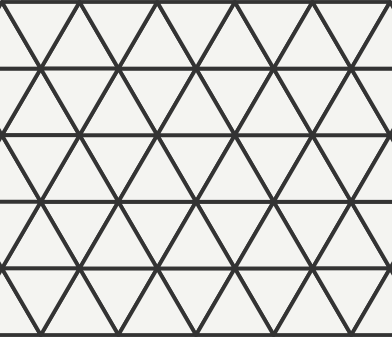
so instead of having a grid of squares you have a grid of triangles, and you can fit hexes into whole numbers of [q r s] (just different letters for [x y z] coordinates, the angles of the axes are similar to a 2d depiction of an xyz space. it's wierd but it works.
Here is the implementation of everything in javascropt (not including the drawing functions) from the site above:
#40 Re: Openspace3D » can openspace3d draw this interface? » 25-Sep-2024 19:22:28
it took a while for me to understand it, but the easiest way to put hexagons together is you make an xyz grid of three axes and then use a bit of math to translate the three axes coordinate (xyz..apparently in the world of hex programming they are called qrs) into two axes coordinates (xy), and from the xy coordinates to the screen coordinates at the middle of wherever the camera is looking. i had to draw out a three axes grid in a graphics app to understand it, and do some counting with my fingers. it's totally doable in scol.
with three axes, you can put hexagons in a grid of whole numbers, and use some geometry math (the pythagorean theorem and some other formulae) to translate those coordinates into xy coordinates, then you can position, as per arkeon's post, the hexagon meshes in the viewport.
https://www.redblobgames.com/grids/hexagons/
so instead of having a grid of squares you have a grid of triangles, and you can fit hexes into whole numbers of [q r s] (just different letters for [x y z] coordinates, the angles of the axes are similar to a 2d depiction of an xyz space. it's wierd but it works.
#41 Re: Programing » very embarrasing running scol files viewing logs [solved] » 25-Sep-2024 19:17:07
send me a pm with your email in it, or send me an email from your profile page i'll send you the file
I have never used BlueFish for coding but I should try it
It would be nice to have the Scol extension for BlueFish
#42 Re: Openspace3D » can openspace3d draw this interface? » 25-Sep-2024 14:37:50
Hello,
even if the plane is not infinite you can reset the camera position at some distance to make it look like infinite plane.
also it depends if you build a big texture with several bitmaps in it or several objects with several materials that repeats.so you can try two approach, one is one big plane and a big texture where you draw the hexagons and insert the pictures.
or you use several hexagons mesh where you apply a material with a bitmap on it.The second method look more flexible to me since it will be easier to get the hexagon click and the texture mipmap will be efficient. also the hexagons outside the camera won't be rendered.
So the plugIT should take a list or a folder of bitmaps, creates the hexagone and clone it at the good coordinates, creates the materials and apply the bitmap on each cell, manage the camera and camera position to reset the position at the opposite when the camera reach a side of the cells content.
Brilliant. Probably easier on terms of the math. Then you could attach data to each hex 3d scene node.
I might as well ask, how would you implement levels of detail with this method (camera moves lower in z,triggering a display of smaller scale hexagons.)
#43 Re: Programing » very embarrasing running scol files viewing logs [solved] » 25-Sep-2024 02:38:09
Can you give me the link to Huet's pdf on Scol?
I code in Scol on Notepad ++ but how do I run my Scol code unless OpenSpace3D offers an option for that.
Otherwise thanks for the advice. I will take the time to make them.
i think there was work on a plugit that could run arbitrary code at some point.
Link:
https://www.sylvain-huet.com/rsc/scol/T … 11_eng.pdf
I code scol with bluefish.
I think arkeon has scol syntax highlighting plugin for it... send me your email and I'll email it to you if you want it sooner.. The install instructions are on redmine.
#44 Re: Openspace3D » can openspace3d draw this interface? » 25-Sep-2024 02:12:37
Hi hebdemnobad
Sorry if no one answers you but arkeon has to finish the Android and Linux builds by switching to VMs which may delay the release of 1.93.
It seems to be complicated what you mean but for now OpenSpace3D does not allow procedural or infinite terrain generation. It seems to be a procedural texture but for now OpenSpace3D does not use procedural texture yet. OpenSpace3D lacks a lot of useful functionality for games and it's a shame.
For the bitmaps I had asked arkeon to create a decals plugin (which I need for my games) but who has not had time to create yet.
I'll try to start on this....all you need is a big matrix of [I I I] tuples and drawing lines based on those tuples
...I say it easier than I can do it!
Arkeon has more important work to do I totally understand.
#45 Re: Programing » very embarrasing running scol files viewing logs [solved] » 25-Sep-2024 01:58:22
Hi hebdemnobad
Being a beginner on Scol I can't really help you but I am an intermediate in programming with plugins on OpenSpace3D and I would now like to learn programming in Scol in order to create my own plugins.
Study Huet's scol tutorial pdf and build the files he describes for the basic data types and structures and logic flow.
Also open up the .pkg files from the tutorials on redmine to see how scol creates ui objects, various built in classes, then learn how to make your own classes with the struct command and you will be on your way.
,
#46 Re: Openspace3D » can openspace3d draw this interface? » 24-Sep-2024 19:23:15
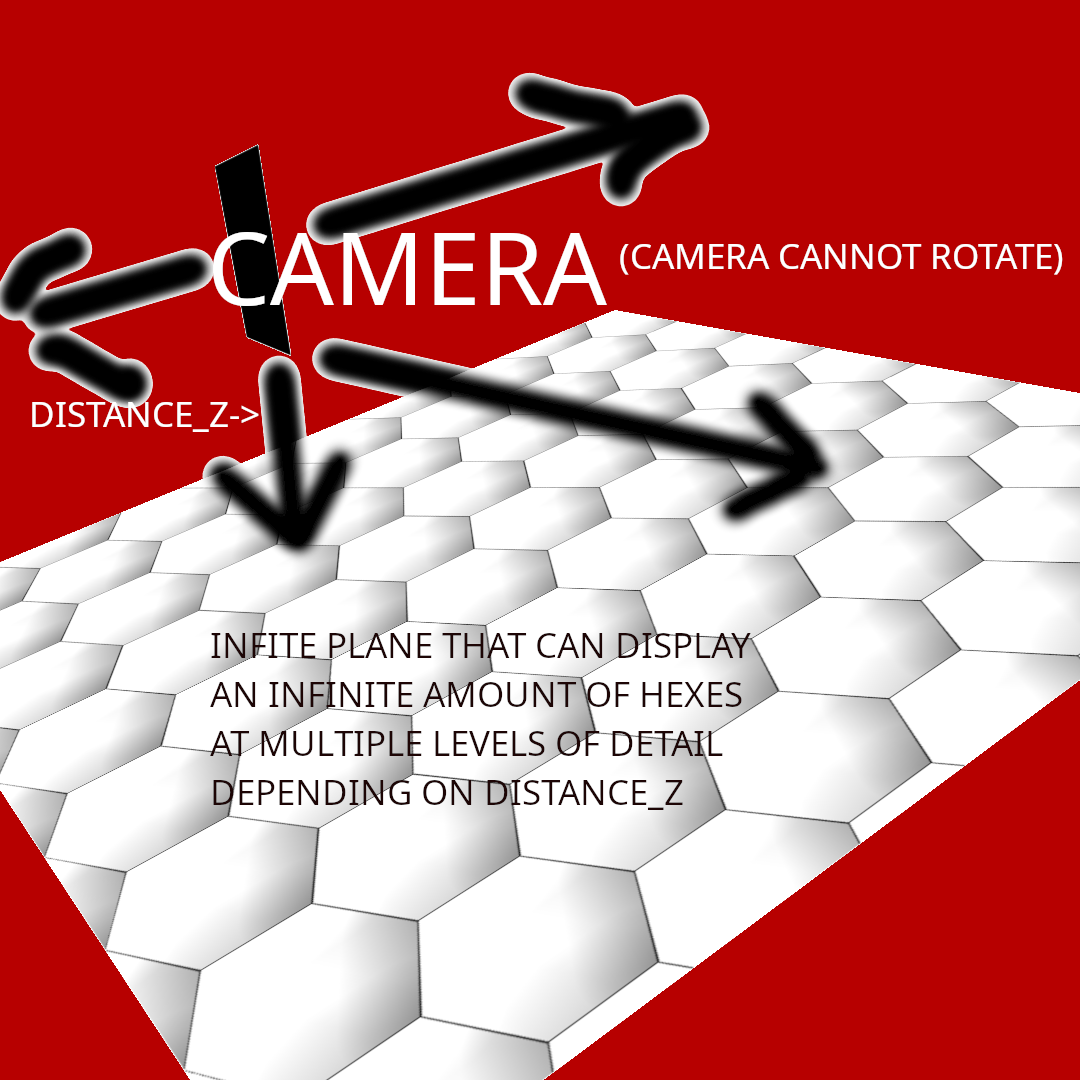
here is a picture of the starting point of the plugit behavior. a camera could move over an endless plain onto which hexagons are drawn using the bitmap api. the camera could move up and down, changing the lod of the hexmap, along with drawing sprites on the hexmap that whose coordinates would be obtainable regardless of the lod. the camera would not rotate, so the scene would appear as 2d in the s03 viewport at all times.
#47 Re: Programing » very embarrasing running scol files viewing logs [solved] » 24-Sep-2024 14:45:12
hi i have everything working now (.scol files get the .pkg files to run code, including showing the console)...however when I have an error in my code, the console won't display at all, and I can't seem to find the relevant log file for each individual .pkg run. any pointers are welcome.
-Dan
#48 Re: Openspace3D » can openspace3d draw this interface? » 24-Sep-2024 14:25:04
a better idea would be to build a hexmap plugit for use in 2d games and interfaces by anyone who uses os3d...i'll draw some pictures by hand on what the ui would look like, and seek guidance after that.
#49 Re: Programing » problems with tabs object from 2d api [solved with workaround] » 24-Sep-2024 14:23:47
OS3D use it's own lib written in scol
load the file g2dlib.pkg, check the os3dplayer.scol for that
https://redmine.openspace3d.com/project … tools.html
I will wait until I build the app logic with the basic ui and then look into using os3d api's to rebuild.
#50 Re: Programing » problems with tabs object from 2d api [solved with workaround] » 24-Sep-2024 14:22:42
arkeon wrote:Hello,
this is a window only API, and honestly I never used it ^^
you can try this https://www.openspace3d.com/scoldoc/_paintwindow.html
_PAINTwindow win; after the last button creation.Thanks ill try rhat. What does os3d use to make tab behavior and what .pkg files are required for that?
i found a workaround, if you call _SETtabSelected tab 0 after you create all the ui elements, and they will appear on the first tab that is selected when you run the main function here:
fun main ()=
	_showconsole;

	let _CRwindow _channel nil 300 50 800 600 WN_NORMAL "test tabs" -> win in
	let _CRtabExpand _channel win TAB_SHOWN -> tab in

	(

	_fooS if tab == nil then "TABS NOT CREATED" else "TABS CREATED";

	_ADDtab tab "number 1" 0;
	_ADDtab tab "number 2" 1;
	_ADDtab tab "number 3" 2;
   //don't call _SETtabSelected BEFORE you create all ui elements, else the elements won't appear on the first selected tab
	//_SETtabSelected tab 0;
	_SETtabPadding tab 10 20;

	_CBtabChange tab @cbTabChange "changed";

	let _CRwindowInTab _channel tab 0 WN_CHILDINSIDE -> child in
	 _CRbutton _channel child 5 50 250 200 0 "BOUTON CHILD 0";
	let _CRwindowInTab _channel tab 1 WN_CHILDINSIDE -> child in
   _CRbutton _channel child 5 5 250 200 0 "BOUTON CHILD 1";
	let _CRwindowInTab _channel tab 2 WN_CHILDINSIDE -> child in
	_CRbutton _channel child 50 50 250 200 0 "BOUTON CHILD 2";
	//call SETtabSelected HERE, AFTER you create the ui elements
	_SETtabSelected tab 0;
	_CBwinSize win @cbSize tab;
	0
	);;