Scolring - Forum
Entraides et échanges autour de la technologie Scol - Informations and exchanges on the Scol technology
Vous pouvez changer la langue de l'interface une fois inscrit - You can change the language once registered
You are not logged in.
- Topics: Active | Unanswered
#26 Re: Openspace3D » set the 3d object position » 6-Dec-2012 21:16:31
im going to try it, thanks arkeon 
#27 Re: Openspace3D » set the 3d object position » 6-Dec-2012 02:18:05
Hello, if the object seems too close with the marker, simply change the object Scale, or the Scale ratio in the marker plugIT
Hello arkeon, thanks for the answer. How about the object position when marker lost?i use the distance plugIT to get an action when 2 objects get closer, but the problem is when marker lost the object still close each other the action keep happen, is that possible the make the object reset it own postition when marker lost?thanks
#28 Re: Openspace3D » speech recognition » 3-Oct-2012 02:50:19
Is the MS Windows service launched ?
i check on my windows service, but i can't find any service named "MS Windows service", how to launch it iri?thanks
#29 Re: Openspace3D » speech recognition » 3-Oct-2012 02:46:23
Hi,
does your windows language in English ?The vocal recognition language depend of the system language.
test with the windows 7 speech recognition.
yes, my windows in english, already test the win7 speech recognition and it works well.
#30 Openspace3D » speech recognition » 2-Oct-2012 02:45:40
- NovanNingnong
- Replies: 16
i'd try the car demo's but when i run it, i say "red" the car suppose to be red, right? it doesn't work here, i make a sample too, a simple event using speech recognition plugIT, i try with simple word like "start", "stop". it didn't workout too, no event happened..
is anything wrong with my computer?
i check my microphone but it working well, by the way i'm using windows7 64-bit..
please help
#31 Re: Openspace3D » modifying marker » 2-Oct-2012 01:56:47
how about set my face potrait to marker? would os3d recognize it?:rolleyes:
#32 Openspace3D » set the 3d object position » 20-Sep-2012 17:36:41
- NovanNingnong
- Replies: 22
how to set the position of the 3d object? when i hit the play button, the object seems so close, i can only see small part of it.
can i set the object far away from camera view? but when i put the marker, the object show up, and when it lost the object return to the position who doesn't show by camera, is it possible? 
i'd try the hide plugIT, but it only hidding the object. the object stay where the marker last found, right? 
anyone help me please?
thanks
#33 Re: 3D » object's color » 18-Sep-2012 08:20:46
i use the standart material, now with 3dsmax 2009 32bit version, everything still the same, turn to gray when imported to os3d.
i've send u the max file include my exported *.scene file..
thx before arkeon
#34 Re: 3D » object's color » 17-Sep-2012 16:57:57
i try with the default material, but no changes, it still grey on os3d...
maybe the problem is in my 3dsmax, i'll try other version tommorow, but thanks for the reply arkeon 
#35 Re: 3D » object's color » 17-Sep-2012 10:54:54
hi arkeon, i got the same problem...
3dsmax 2009 64-bit and easy ogre exporter version 1.0
here is my screenshot, i put a material on teapot
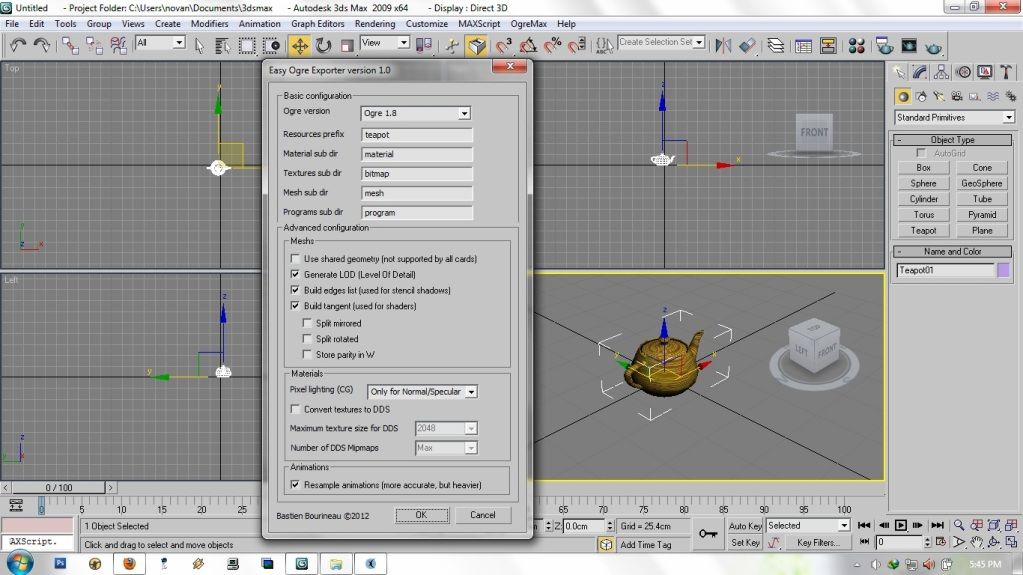
it export successfully, but when i import the teapot to os3d it turns to gray, can u help me please?
best regrads,
#36 Re: Openspace3D » Distance between markers AR » 16-Sep-2012 03:27:51
Hello friends,
I created an example of following the guidelines Arkeon. It worked perfectly.
Follow the link to download the project.
Link DownloadImportant detail. Print markers 819 and 821 with the exact size of 67mm (0.067 m) each.
thanks for help me alex, really helpful..
thanks to arkeon too,
thanks for sharing;)
#37 Re: Openspace3D » Distance between markers AR » 13-Sep-2012 10:04:25
Hmm you're right the unit info is missed somewhere
every units in OS3D are meter, on the marker the size is the real size of the marker.for example if your object is 20cm and the real paper marker size 10cm then you set the marker size to 0.2 if you want your object fit the marker.
but this way the object position will be multiplied by the marker size and then be twice further than a maker with the correct object / marker ratio.
so the distance between objects will be more complicated to get.
the better way is to scale the object to fit the real marker size and set correctly the marker size in the plugIT.then to detect the distance, if your object is 10cm radius you can set the distance between your object to 0.15 m for example to detect the collision.
then the In event will be throw when the objects are closes. you can then link the In event to a sound plugIT for example.don't forget that the misc debug console can permit you to trace some data in the console (bottom of OS3D interface).
arkeon, could u help me how to make an event for that?im just start to learn how to use the os3d, i really have no idea how to use the distance plugIT, i upload the file, can u modified it?so i can learn it, please?:(
#38 Re: Openspace3D » Distance between markers AR » 10-Sep-2012 06:28:31
dear arkeon the admin, i'd try the distance plugIT, i got 2 dummies with sphere object inside, 2 markers with same scale, but i still confuse about how to get an action, i fill the first object with dummy1, second object with dummy2, there is "distance" right down second object,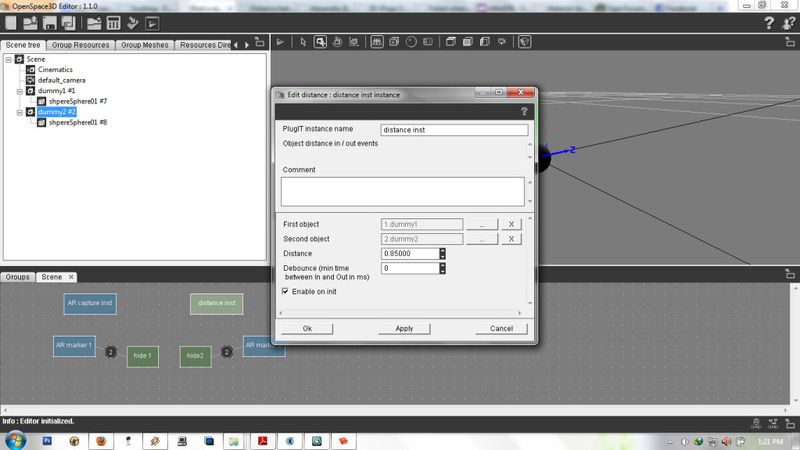
what is the unit of that?inch?centimeter?then after i set the distance plugIT what kind of link that i have to connect between the markers and distance plugIT?sorry for asking u a lot of question, im newbie and really need ur help arkeon, thanks before
#39 Re: 3D » Failed when exporting 3d animated object into ogre » 10-Sep-2012 03:06:44
hi !
about the exported rotation do you see the animations in the os3d tree ?
if you only set 2 from 0 ° to 360 ° the interpolation will make a rotation of 0 degree ^^
you can add a key each 90 ° for better result or check the "resample animation" option in the easy ogre exporter.about blender I know that blender 2 Ogre can have some difficulties with the skeletons, try to get some advice from the ogre forum or try an another exporter.
good luck
hi arkeon, how to make it loop?i got same problem like above, then i do what u said, add key each 90°, it works, but the problem now is i need loop rotation, it only rotate once. one more question, my sphere turn to grey in os3d, is there any setting to make the colors same with my 3d object in max? thx before 
#40 Re: Openspace3D » Distance between markers AR » 8-Sep-2012 16:51:49
Welcome
to detect the distance on AR objects you must set the same scale on the marker plugIT, if you don't want to use a mesh you can add a dummy on each marker and then use this dummies on the object distance plugIT.
thx arkeon, i'll try it now, hope it works:)
#41 Re: Openspace3D » Distance between markers AR » 8-Sep-2012 12:28:58
Hi !
if you use the same scale on markers and objects you can use the distance plugIT to get an event on closes objects
dear admin, i'm on this too, then how to do it?can u give me short tutorial to do this, i'm newbie in openspace3d, thx before really appreciate it