Scolring - Forum
Entraides et échanges autour de la technologie Scol - Informations and exchanges on the Scol technology
Vous pouvez changer la langue de l'interface une fois inscrit - You can change the language once registered
You are not logged in.
- Topics: Active | Unanswered
#151 Re: Scol » First step to Scol on Android » 29-Jun-2015 14:24:16
Hello,
from the apk sample see previous post :
This is a scol installation with defaut demo
but since this is scol you can find the partition in /sdcard/Android/ogre.imaginer.scol/files/Partition
you can copy any scol program here and try to launch
for openspace3D scene export one in standalone mode, and copy all the exported partition directory in the one on the device.with this you can try you're own scene, but don't use shader until you make it in opengles
thx i will try this when i go on vacation soon (i know i've been quiet the last few months, in the warm weather i'm outside more.....i think i will be rebuilding my player project for android since the windows market is so small, and i am sure the whole approach to using scol on android must be different since you are using the 'page' like interface as opposed to the windows interface
#152 Re: Openspace3D » how did you guys make that lazer beam » 29-Jun-2015 14:16:12
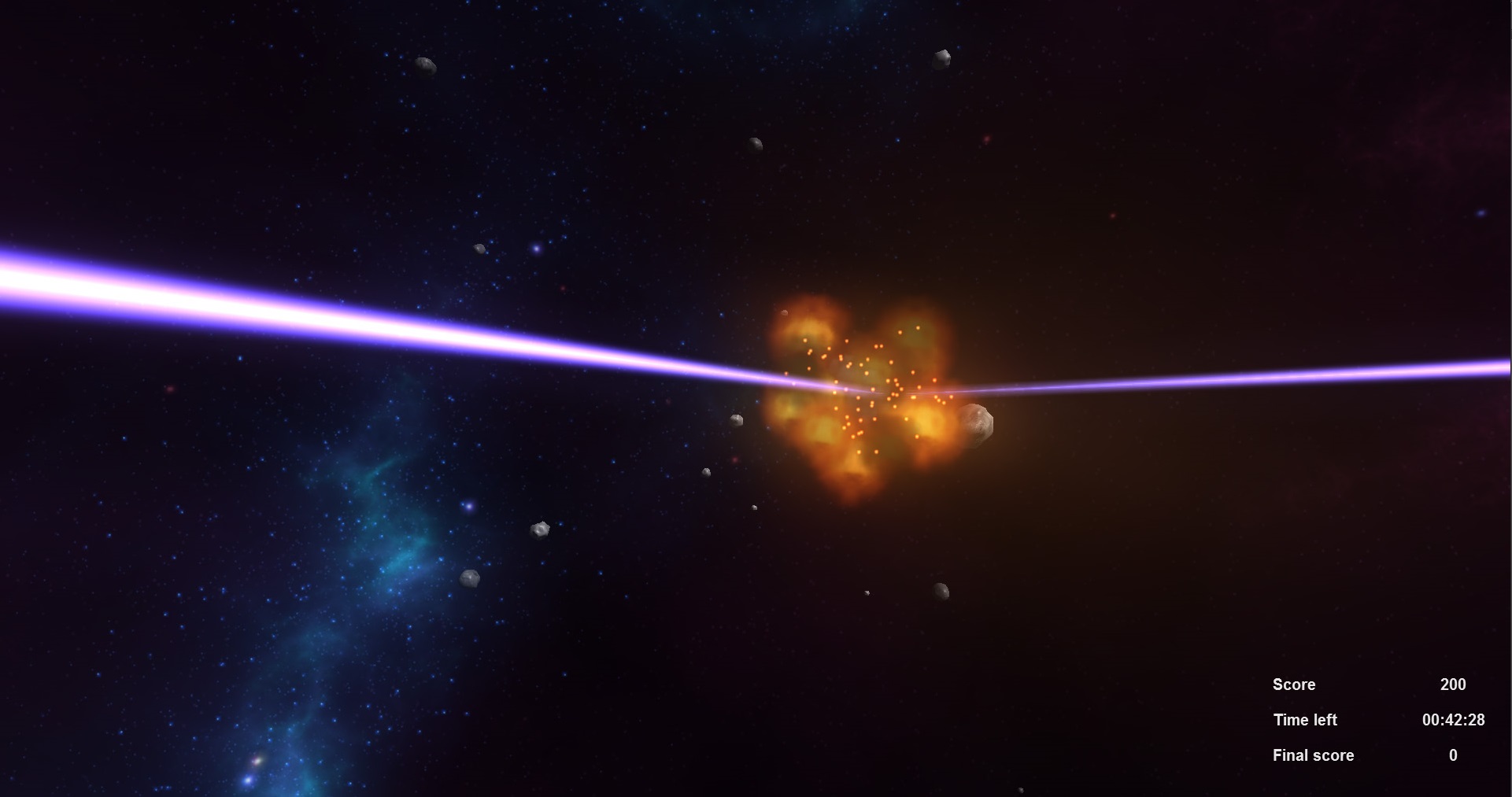
as you can see in the tobii demo this is simple plane objets with png texture scaled by the distance and direction
ahh, i see
#153 Openspace3D » how did you guys make that lazer beam » 29-Jun-2015 13:45:19
- hebdemnobad
- Replies: 2
hey guys, how did you make this laser beam with os3d?
#154 Re: Scol » First step to Scol on Android » 29-Jun-2015 13:20:55
arkeon....is there a way to build and run scol on android atm? if it's too complicated for you to explain, in other words, if it's better for us to be testing it when it is a bit more ready to distribute, I understand. i know this is alot of heavy lifting. (u.s. word for very hard work)
#155 Re: Scol » First step to Scol on Android » 10-Jun-2015 12:34:08
#156 Re: Scol » First step to Scol on Android » 18-May-2015 12:47:01
We now have sound, networks, crypto, curl...
still the inputs and 3D engine in progress
I'm so happy for the scol community! And you have developers doing a great job. Congratulations and thanks to them too. (Maybe I'll finish a plugit or two by the fall) 
#157 Re: Scol » First step to Scol on Android » 16-May-2015 14:02:53
Great!!!
#158 Re: Pub - Café » time for a mascot » 17-Mar-2015 13:32:17
hehe yes rigging need master skills
No idea on blender but this is already a hard job on max.
seems pretty good now.
Thx...when I'm done with the fk version of this I will sell it on http://cgcookiemarkets.com/blender/ and make it available for free to everyone who has joined this forum on the date that I put it for sale.
Maybe I'll seek some input on the spline ik issue on http://blenderartists.org but with so few bones and polys I doubt I can make it work. To stay under the 64 bone limit I can only put 6 bones in a tentacle since I need bones to manipulate the webbing and siphon.
#159 Re: Pub - Café » time for a mascot » 17-Mar-2015 13:21:11
There's this one out there:
http://www.turbosquid.com/3d-models/3d- … ion/813420
But its 52k polys and probably has much more than 64 bones
#160 Re: Pub - Café » time for a mascot » 16-Mar-2015 21:17:00
oh man was rigging a headache, especially for the webbing between each tentacle.
i went down the rabbit hole with blender but managed to learn a few things.
i tried ik setups for a while, but i gave up. with hardware skinning on cheap gpu's (i'm thinking of a web audience which isn't filled with gamers,. so shader model 2 or shader model 3), you can only put 64 bones in a rig. so you cannot take advantage of things like spline ik, that appears to require more bones and vertices to work well (i tried...if anyone has a pointer, feel free to share) .
but this guy works with under 64 bones...i still have to normal map, lock the weight groups, and add swimming animations, eye animations, and animating the siphon that the octopus uses to propel itself and otherwise move around.
around 3.2k polies, i will try to reduce that a bit since i am making the transition between bones one edge loop on average. it isn't hyper realistic, but it's developed a bit. to make this guy move like a real octopus, you need a lot more bones and polygons.
#161 Re: 3D » from blender to OS3D - without textures » 9-Feb-2015 02:44:31
i use diffuse and normal maps for opengl display while modeling and animating in blender, then use blender2ogre, then i use the ogrecommandline tools for ogre 1.9 (arkeon are those on redmine? ogre3d still has 1.7.2 command line tools linked to their homepage, why, idk) to convert the .mesh and .skeleton to mesh.xml and skeleton.xml, the convert back to binary, using the .hlsl and .material that i posted the the wiki 3(?"!) years ago (the shader i use uses greyscale for specular and alpha, and it has a quirk or two)
http://www.ogre3d.org/tikiwiki/tiki-ind … e%20Shader
btw a great shader library is distributed by the realextend people...i tried to get their shaders to work in os3d a couple of years ago but didn't figure it out.
#162 Re: Pub - Café » time for a mascot » 23-Jan-2015 17:49:55
hehe yes rigging is a source of headache
anything that has a bunch of hanging tentacles is hard...i haven't figured out how to do weight painting with selection masks turned on, so i'm always moving my object around to get at that one annoying vertex... since it's moving around, if it doesn't have any really obvious artefacts it will make it past my quality control.
#163 Re: Pub - Café » time for a mascot » 23-Jan-2015 17:07:53
ack!!! i had forgotten so much about animating and rigging in blender..i was using poser 5 to generate motion data (you can easily animate tentacles), but everything got mixed up when i exported to poser. plus skinning is tough when i can't use morph animations to take care of some deformation glitches from the bones...but my mascot is close to ready. it needs a space suit though, and i think it will have an addiction to cigarettes.
#164 Re: Scol » what type of wii devices are ported to scol? » 9-Jan-2015 18:58:52
thanks when I know more about the models my kid wants I will see you before they fall under the classifications you discussed.
#165 Scol » what type of wii devices are ported to scol? » 9-Jan-2015 18:32:54
- hebdemnobad
- Replies: 3
Colleagues...
what type of wii devices are ported to scol?
My sons but birthday is coming up and I'm wondering if he could use the game while I could use the input devices with scol.
Is it only certain Wii devices/versions?
Thx!
#166 Re: Pub - Café » time for a mascot » 7-Jan-2015 21:41:07
yes it must have been some type of data corruption, the animation plugit works fine, all is well. this is great, since the shader that this figure uses uses hardware skinning, and with bone scaling you can get morph-like effects and keep using the shader. (if you add vertex animations to a .mesh that uses this shader, it won't compile/render/i can't remember what, but it doesn't work)
perhaps some naughty electrons were to blame?
this uses spacekey down to start animation, and spacekey up to stop animation:
#167 Re: Pub - Café » time for a mascot » 7-Jan-2015 20:46:19
just imported this file and all is ok for me...
it did it only when I use your XOS project.I'll try to find out tomorrow
So it works as expected in os3d?
#168 Re: Pub - Café » time for a mascot » 7-Jan-2015 20:13:40
ok it works
but yes the result is strange ^^
no idea why for now
the s03 engine is somehow distorting the scale and/or size of a bone that I did not alter (I made sure of this by clearing the tranformation for all of the bones in the head except for the last one, to make the head inflate and deflate..
fwiw here is the .mesh and dependencies (there is no copyright on it, it's all home made)
the paths in the .material file are set to Openspace3D/mascot, so unzip into the root folder if you are so inclined.
#169 Re: Pub - Café » time for a mascot » 7-Jan-2015 19:35:08
i have access to a less fussy network...here arkeon try this link: http://www.ifam.net/openspace/mediaocto … index.html
i will post a .zip of the .mesh and dependencies
#170 Re: Pub - Café » time for a mascot » 7-Jan-2015 16:27:48
to generate content for online version without uploading just uncheck the "upload to server" option
I'll try that thx.
#171 Re: Pub - Café » time for a mascot » 7-Jan-2015 14:08:52
i will try clearing some keyframes in blender...for some reason os3d is seeing a bone transform happen, whereas in blender and the 2 ogre viewers i mentioned, the transform is not changing.
hmmm. it is much better to use bones to distort the size of a parts of mesh than vertex animation...it takes up less space and is one less thing to get broken every time blender versions change.
i will post results later today...i have to get off the bus now, and can post some work on way back the 150km ride.
#172 Re: Pub - Café » time for a mascot » 7-Jan-2015 13:54:19
http://ifam.net/openspace/mascot/
it works for me an i'm on a firewalled network on a long distance bus...the network here doesn't allow me to ftp upload an .os3d web page and depency files via os3d, so i exported as a local web project and uploaded the folder with dreamweaver.
oh computers! wheels and levers are so much simpler.
#173 Re: Pub - Café » time for a mascot » 7-Jan-2015 13:44:57
the last blender format is not yet fully supported by Assimp project
what is the last supported version...i have around a dozen versions of blender on my computer (some do x, some do y, some do z....it's a mess but it's still great software, they just don't pay much attention to versioning issues, especially with exporters to ogre )only ogre 2.3x can import .mesh files, fwiw... but hey it doesn't cost $1000 USD or more).
#174 Re: Pub - Café » time for a mascot » 7-Jan-2015 13:38:50
when you says the result is different in OS3D and Ogre meshy for ogre format
can you show me that difference ?
yes, here....
in os3d, the front part of the head gets resized and distorted (i want to distort the head, but not the part indicated here...)
the head is not distorted this way in ogre meshy (or the ogre mesh viewer)

here is the os3d scene, press b to start animation, release b to stop it:
http://ifam.net/openspace/mascot/
#175 Re: Pub - Café » time for a mascot » 7-Jan-2015 13:18:54
.blend format. (blender 2.66)